> For the complete documentation index, see [llms.txt](https://facedev.gitbook.io/bussin-web-x-how-to-make-a-website/llms.txt). Markdown versions of documentation pages are available by appending `.md` to page URLs; this page is available as [Markdown](https://facedev.gitbook.io/bussin-web-x-how-to-make-a-website/for-developers/css-3.25.md).
# CSS 3.25
CSS 3.25 looks similar to regular CSS 3, but with some differences. Note that B9 is a new engine, not all classic CSS 3 features are supported.
## Basic structure
This is an example of a CSS 3.25 file.
{% code title="styles.css" overflow="wrap" lineNumbers="true" %}
```css
div {
border-color: #616161;
border-width: 1px;
border-style: solid;
border-radius: 12px;
padding: 10px;
direction: row;
align-items: center;
gap: 10;
}
h1 {
padding: 20px;
color: #444;
}
p {
font-size: 16px;
line-height: 1.5;
font-family: Iosevka;
font-weight: bold;
border-style: solid;
border-width: 5px;
border-color: red;
border-radius: 12px;
}
h4 {
font-size: 30px;
}
a {
color: #007bff;
font-size: 16px;
text-decoration: none;
font-weight: ultralight;
underline: double;
underline-color: #ff0000;
overline: single;
overline-color: #ff0000;
strikethrough: true;
strikethrough-color: #ff0000;
margin-right: 50px;
}
ul, ol {
margin-left: 20px;
}
ok {
color: #FF3232;
}
select {
padding: 5px;
border-width: 1px;
border-style: solid;
border-color: #ccc;
border-radius: 3px;
margin-left: 40px;
}
hr {
border-color: #ccc;
border-width: 1px;
border-style: solid;
}
```
{% endcode %}
Looks like a lot? It's not that complicated. It's just about taking a few things into account and then just checking a list of properties.
## Take into account
1. **No selectors are required:** You don't need to use a dot to select a class (e.g. `.myClass {}`). Since there's no ID's to differentiate with, just put the class name without anything (e.g. `myClass{}`).
2. **Use specific units:** Only **px** (which is translated to **pt**) for measures and **HEX** (#123456) for colors are supported. No RGBa, no HSL, no em, no viewport units...
3. **Remember how the CSS box model works:** We use CSS 3's standard box model, where a box has a SIZE, then a PADDING, then a BORDER and a MARGIN.
4. **Events are not supported:** As of B9 v1.2.2, events (like `:focused`, `:hover`, and so on) are not supported.
Noted that? Now let's get to the styling features.
## Styling
### Global
> Global styles that can be applied to anything
| Property | Possible value | Explanation |
| -------------------- | ------------------------------------------------------------------------------------------------------------------------------------------------ | ------------------------------------------------------------------------------------------------------------------------------------------------------------------------------------------------------------------------------------------------------------------------------------- |
| `padding` | Any `px` value | Gives the text a custom padding. Padding is the space inside of the box. |
| `margin-{direction}` | Any `px` value | Gives the text a custom margin. Margin is the space outside of the box. **See "About margin" before using it"** |
| `border-width` | Any `px` value | Sets the width of the border. It acts as a summoning directive - this means that it needs to be declared and given a value greater than 0 for the border to be rendered in the first place. If you use any other `border-*` directive without declaring width, you won't see anything |
| `border-color` | Any `HEX` value | Sets the color of the border. |
| `border-style` | Any of the following: `none`, `hidden`, `dotted`, `dashed`, `solid`, `double`, `groove`, `ridge`, `inset`, `outset`. ***Visual example below.*** | Gives the border a custom style. *Since there are a lot of options, scroll down for an image preview of each one*. |
| `border-radius` | Any `px` value | Gives the border a custom roundness. |
| `opacity` | Any numeric value from 0 to 1. Decimals (0.5) supported. | Gives the item a custom opacity. Opacity is the opposite of transparency, being opacity = 1 a fully visible item, opacity = 0 a transparent, invisible item, and opacity = 0.5 something in between, half transparent and half opaque. |
| `background-color` | Any `HEX` value | Gives the item a background color. If not set, will use the default one depending on the user's theme (or not at all). |
{% hint style="warning" %}
#### About margin
`margin` by itself is not supported by B9 as of 1.2.2. You need to give a direction. If you want to set the padding of the top of the box, use `margin-top`, for example.
{% endhint %}
| CSS 3.25 directive | Direction |
| ------------------ | ------------------------ |
| `margin-top` | Top of the box (UP) |
| `margin-bottom` | Bottom of the box (DOWN) |
| `margin-left` | Left of the box |
| `margin-right` | Right of the box |
{% hint style="info" %}
`border-style` values visualised.
{% endhint %}
### Layout
> Use these in combination with `
`s to organise your layout.
| Property | Possible value | Explanation |
| ------------- | ------------------------------------------------------ | --------------------------------------------------------------------------------------------------------------------------------------------------------------------------------------------------------------------------------------------------------------- |
| `gap` | Any `px` value | Sets the amount of space (in pixels) that will be created between all the elements that are inside of a `
` |
| `direction` | `row` or `column` | The direction all the items inside of the `
` will follow. Default is `column`. Similar to CSS 3's flex display (*but no "display: flex;" required here*). |
| `wrap` | `wrap` or `nowrap` | If enabled, when there are too many elements inside of a parent container, they will be moved to the next line (they will be *wrapped*). If not, the elements will just overflow. Defaults to `nowrap`. |
| `align_items` | Any of the following: `fill`, `start`, `end`, `center` | Defines if the items should be aligned to the center of the container, to the start, or to the end. If set to fill, the item will expand to fill all available horizontal space within its container instead of just moving to get aligned. Defaults to `fill`. |
### Text
> Use these to style your texts
| Property | Possible value | Explanation |
| ------------- | ----------------------------------------------------------------------------------- | ------------------------------------------------------------------------------------------------------------------------------------------------------------------------------ |
| `font-size` | Any `px` value | Gives the text a custom size. There is a default for each text tag (`h1`, `h2`, `p`...) |
| `line-height` | Any `px` value | Gives the text a custom line-height. There is a default for each text tag. |
| `font-family` | String value | Gives the text a custom font. `` does not support font files, so the end user must have that font installed. As of B9 v1.2.2, fallback fonts don't seem to be supported. |
| `font-weight` | Any of the following: `ultralight`, `light`, `normal`, `bold`, `ultrabold`, `heavy` | Gives the text a custom font weight. |
| `color` | Any `HEX` value | Gives the text a custom color. |
{% hint style="warning" %}
**On runtime, `px` values get translated to `pt` values** by B9.
{% endhint %}
### Text underline / overline / strikethrough
> Non-standard, this feature doesn't exist on CSS 3.
| Property | Possible value | Explanation |
| --------------------- | ---------------------------------------------------------------- | ---------------------------------------------------------------------------------------------------------------------------------------------------- |
| `strikethrough` | `true` or `false` | Gives the text a strikethrough. |
| `strikethrough-color` | Any `HEX` value | If strikethrough is present, this will set the color of the strikethrough. |
| `overline` | `none` or `single` | Gives the text an overline (like an underline, but instead of under, over). Single is equivalent to "true" (but don't pass `true` as it won't work). |
| `overline-color` | Any `HEX` value | If overline is present, this will set the color of the overline. |
| `underline` | Any of the following: `none`, `single`, `double`, `low`, `error` | Gives the text an underline. |
| `underline-color` | Any `HEX` value | If underline is present, this will set the color of the overline. |
### Input and textarea
> Width and height are considered "Layout" directives, but since they are only supported by `` and `
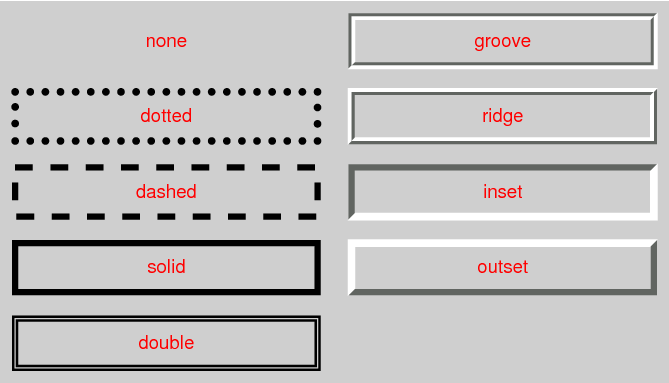 `border-style` values visualised.
{% endhint %}
### Layout
> Use these in combination with `
`border-style` values visualised.
{% endhint %}
### Layout
> Use these in combination with `